
Host Audit Trail vs Sensor Record for an Audit-Rule Change on Linux
What a commercial EDR platform recorded versus the host's own audit log for an audit-rule change on a Linux distribution.
Host Audit Trail vs Sensor Record for an Audit-Rule Change on Linux
Updated October 20, 2026, about 12:00 PM PT: removed the Linux distribution name, which could identify the cloud provider; findings unchanged.
Updated 20 October 2026: added a disclosure about a second security agent on the lab host; findings unchanged.
A plain-English, vendor-neutral account of what a commercial endpoint detection and response (EDR) platform recorded, compared with the host's own Linux audit trail, when an administrator changed the host's audit rules around a benign service cycle on one Linux lab host. EDR is security software that watches each computer and records what programs do; the Linux audit subsystem (auditd, configured with auditctl) is the operating system's own logging of security-relevant events. Tested against a commercial EDR platform in its full-prevent policy; vendor not named. Identifiers that could create exposure are redacted; the host is shown as [HOST] and the sensor's service as [EDR-SENSOR-SERVICE]. A companion method note explains the audit-rule pitfall behind this test: https://www.senninsecurity.com/research/038-method-pitfall/index.html.
During the later session on the Linux lab host, the EDR sensor under test recorded each command that changed the host's audit rules — removing the default rule, adding the file-watch, removing the watch, and restoring the default rule — as ordinary process starts, with matching command lines and times. It also recorded the command that wrote the watched unit file. In the event types present in the sensor records we pulled for that host and window, we found nothing other than those process starts that referred to the audit rules being changed. The host's own audit log was the only one of the two to record the audit-rule change itself and the file-watch hit. The sensor raised no alert on that host, including in a re-check about 30 minutes later. One read-only rule-listing command after the restore had no process-start record; we have not determined why. A separate read-only check on an Ubuntu lab host, where the audit subsystem was disabled, is inventory only and is not a comparison.
A cloud provider's runtime threat-monitoring agent was also installed and running on the Linux lab host during this run. It may log or act on activity independently of the EDR sensor under test, and it may affect what that sensor records or alerts on. Its effect on these results was not tested.
Disclosures
Rendered terminal output shown below is rendered from masked transcripts (not live console captures). An unrelated scratch text file left on the host on October 15 sat outside the watched path during the session; it was not executed, does not affect this result, and has since been archived and removed.
- For the dummy unit, the sensor recorded only a unit-deleted record (at the disable step). There was no unit-created record for the dummy unit; separate unit-created records in the window belong to unrelated sessions and are not cited as evidence of this test.
- One read-only rule-listing command (
auditctl -l) after the restore had no process-start record in the sensor pull; the cause is unknown. We draw no conclusion from this gap. - This result rests on the Linux Part B run only. The sensor raised zero alerts on that host, including a re-check about 30 minutes later.
- A cloud provider's runtime threat-monitoring agent was also installed and running on the Linux lab host during this run. It may log or act on activity independently of the EDR sensor under test, and it may affect what that sensor records or alerts on. Its effect on these results was not tested.
- We use generic event descriptions only (“process start”, “rule-add record”, “path record”); no vendor event-type names are used.
Evidence — method and commands
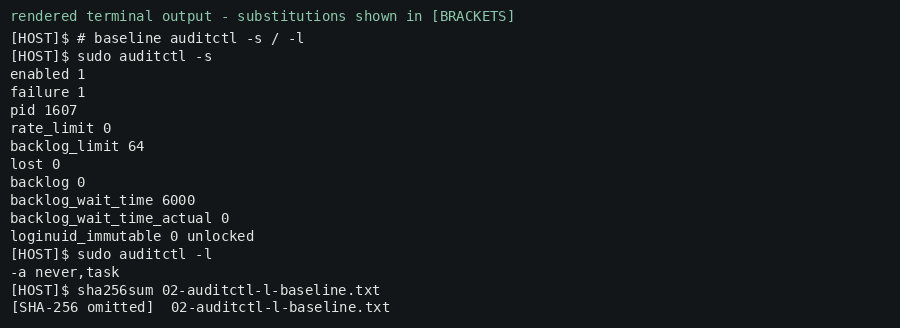
An operator removed the default audit rule, added a file-watch on a harmless lab-owned unit, ran a benign create/start/stop/disable/remove cycle, removed the watch, and restored the default rule, while both the host audit log and the sensor record were available for comparison:
#!/usr/bin/env bash
# SSS-RC-2026-038 Part 01 (A) - host audit vs sensor overlap, Linux Part B.
# Each audit-rule-changing command is an ordinary process start the sensor can record.
sudo auditctl -s; sudo auditctl -l                         # baseline
sudo auditctl -d never,task                                # remove the default rule
sudo auditctl -l                                           # list after remove
sudo auditctl -w /etc/systemd/system/sss-lab-dummy.service -p wa -k sss038_dummy   # add watch
sudo auditctl -l                                           # list after watch
sudo tee /etc/systemd/system/sss-lab-dummy.service >/dev/null <<'UNIT'
[Unit]
Description=SSS lab dummy service (benign, lab-owned, safe to remove)
[Service]
Type=simple
ExecStart=/usr/bin/sleep infinity
[Install]
WantedBy=multi-user.target
UNIT
sudo systemctl daemon-reload; sudo systemctl enable sss-lab-dummy.service; sudo systemctl start sss-lab-dummy.service
sudo systemctl stop sss-lab-dummy.service; sudo systemctl disable sss-lab-dummy.service
sudo ausearch -k sss038_dummy --start recent              # host audit view (rule add + path record)
sudo systemctl stop sss-lab-dummy.service 2>/dev/null; sudo systemctl disable sss-lab-dummy.service 2>/dev/null
sudo rm -f /etc/systemd/system/sss-lab-dummy.service; sudo systemctl daemon-reload
sudo auditctl -W /etc/systemd/system/sss-lab-dummy.service -p wa -k sss038_dummy   # remove watch
sudo auditctl -a never,task                                # restore the default rule
sudo auditctl -l                                           # list after restore
Evidence — rendered terminal output (redacted)


Methods and limitations
Tested against a commercial EDR platform in its full-prevent policy; vendor not named.References
- SSS-RC-2026-038 Part 01 Validation memo (VAL-02, claim 038-A)
- Companion method note: A Default Linux Audit Rule Can Silently Suppress File-Watch Capture https://www.senninsecurity.com/research/038-method-pitfall/index.html
- VAL-01 disclosures (scratch file outside watched path; rendered-terminal-output labelling)
Want to know if your endpoint defenses still work?
We test them in your environment and give you a plain written answer.