
Stopping and Restoring a Harmless Service on Linux: What a Commercial EDR Platform Records
On one Linux lab host, the EDR sensor under test recorded process starts for each tested service command in a 12:00 AM PT run but missed several in a 12:42 AM PT repeat.
Stopping and Restoring a Harmless Service on Linux: What a Commercial EDR Platform Records
A plain-English, vendor-neutral account of what a commercial endpoint detection and response (EDR) platform records on Linux when an administrator stops, disables and removes a service. EDR is security software that watches each computer and records what programs do; on Linux a service is a background program managed by systemd and controlled with systemctl. The product is not named.
Updated October 20, 2026, about 12:00 PM PT: removed the Linux distribution name, which could identify the cloud provider; findings unchanged.
Updated 20 October 2026: added a disclosure about a second security agent on the lab host; findings unchanged.
Updated 20 October 2026: corrected the summary sentence; findings unchanged.
Updated October 20, 2026, about 1:40 AM PT: scoped the sensor claim to the first run (12:00 AM PT) and added Validation’s repeat-run (12:42 AM PT) disclosure; corrected the systemd unit-directory wording in the text and the frame caption; and labelled the command listing and the frames by run.
"Under the tested conditions on one Linux lab host, with a commercial EDR sensor running under a full-prevent policy, we created, started, stopped, disabled and removed a harmless dummy service we owned. The host’s own logs recorded each of those steps, and the host’s service list matched its starting state afterward. In the October 20 run at 12:00 AM PT, the EDR sensor under test recorded process-start events for each of those commands, and raised no alert for that host in the windows we checked."
In a later repeat run on the same host, the EDR sensor under test recorded process-start events for the baseline checks, enable, start, the dummy process, the journal capture, the reset step and the final checks, but not for the stop, disable, both service reloads, the file deletion, or the status checks, although the host log shows they ran. We have not determined why. The sensor therefore did not record these commands consistently across runs. It raised no alert on the host in either run.
A scratch text file left by an earlier, unrelated run on October 15 was present on this host during the run; it was not executed, sat outside the test directories, and has since been archived and removed.
A cloud provider's runtime threat-monitoring agent was also installed and running on the Linux lab host during these runs. It may log or act on activity independently of the EDR sensor under test, and it may affect what that sensor records or alerts on. Its effect on these results was not tested.
Environment
One Linux lab host (kernel [DISTRO-KERNEL]), a commercial EDR sensor under a full-prevent policy. Identifiers that could create exposure are redacted; the host name is shown as [HOST] and the sensor’s service name as [EDR-SENSOR-SERVICE]. Methods line: tested against a commercial EDR platform in its full-prevent policy; vendor not named.
Method and commands
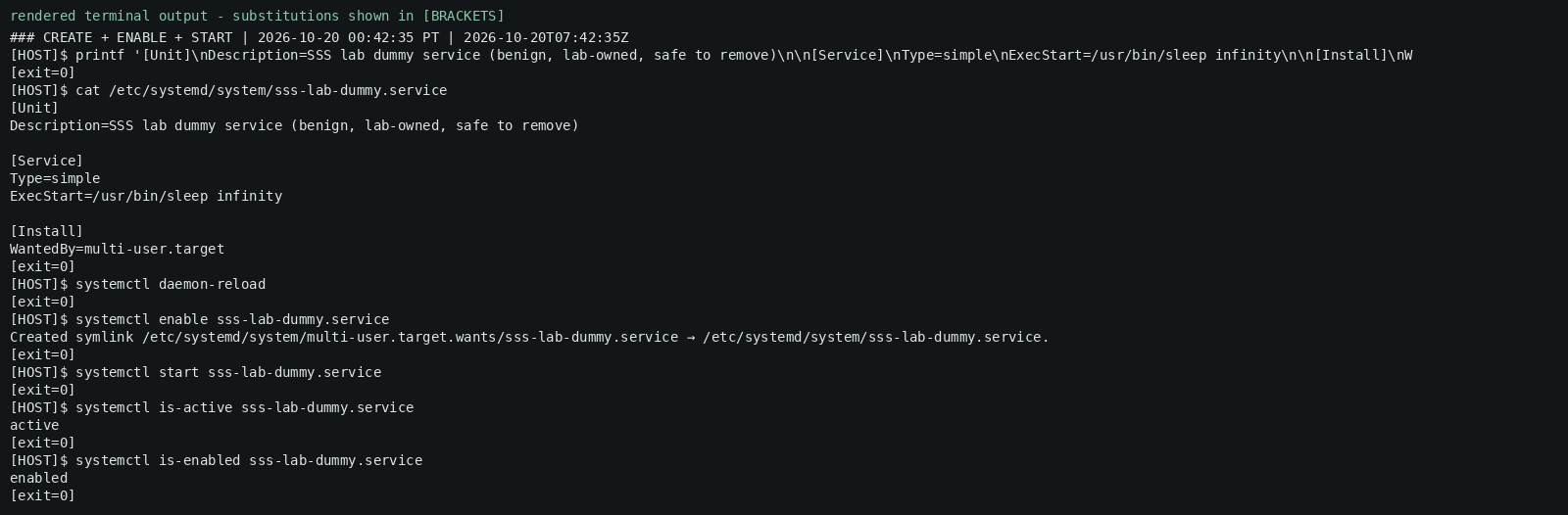
An operator created and started a harmless dummy service that only runs sleep, then stopped, disabled and removed it, and confirmed the host’s service-list hash matched its starting state. The commands below are the first-run (sensor-witnessed) script, which writes the unit with tee; the 12:42 AM PT run shown in the frames uses a printf form of the same unit write. The exact commands:
#!/usr/bin/env bash
# SSS-RC-2026-036 Part 01 - benign dummy-service create/start/stop/disable/remove.
# Target ONLY the lab-owned dummy unit. Never touch any real security service.
sudo tee /etc/systemd/system/sss-lab-dummy.service >/dev/null <<'UNIT'
[Unit]
Description=SSS lab dummy service (benign, lab-owned, safe to remove)
[Service]
Type=simple
ExecStart=/usr/bin/sleep infinity
[Install]
WantedBy=multi-user.target
UNIT
sudo systemctl daemon-reload
sudo systemctl enable  sss-lab-dummy.service
sudo systemctl start   sss-lab-dummy.service
# Stimulus
sudo systemctl stop    sss-lab-dummy.service
sudo systemctl disable sss-lab-dummy.service
# Restore
sudo systemctl stop    sss-lab-dummy.service 2>/dev/null
sudo systemctl disable sss-lab-dummy.service 2>/dev/null
sudo rm -f /etc/systemd/system/sss-lab-dummy.service
sudo systemctl daemon-reload
# Check: unit gone, no dummy process, service-list hash equals the starting state
systemctl list-unit-files 'sss-lab-dummy*' --no-pager
pgrep -af 'sleep infinity' || echo "no dummy process"
systemctl list-unit-files --no-pager | sha256sum
What the sealed sensor record shows (the October 20 run at 12:00 AM PT, sensor-witnessed)
In the October 20 run at 12:00 AM PT, the EDR sensor’s own event stream independently recorded process-start events matching the host log for the baseline checks, the unit write, daemon-reload, enable, start, the dummy process, stop, disable, the journal capture, the restore steps and the check-step hashes. The record window held 191 records in total (background included). Alert queries returned zero alerts for this host in the windows checked. For the file deletion (rm -f): the 12:00 AM PT run recorded it; the October 15 run and the 12:42 AM PT run did not.
A cloud provider's runtime threat-monitoring agent was also installed and running on the Linux lab host during these runs. It may log or act on activity independently of the EDR sensor under test, and it may affect what that sensor records or alerts on. Its effect on these results was not tested.
Host evidence — rendered terminal output (redacted)
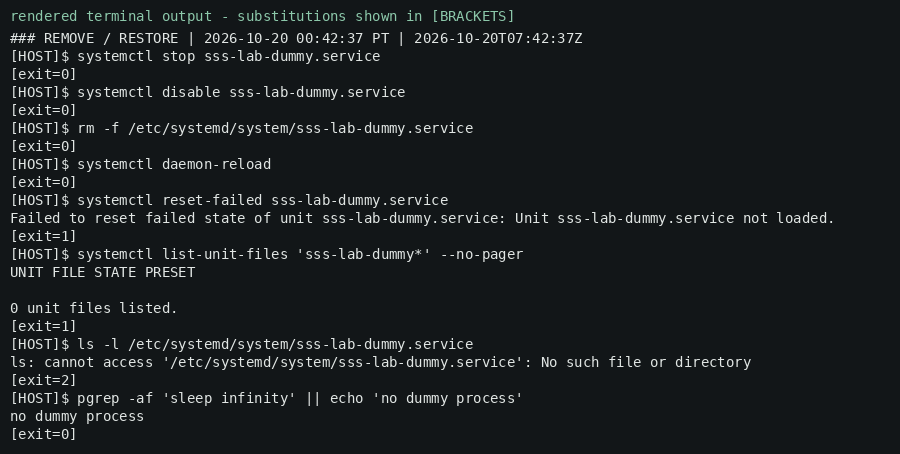
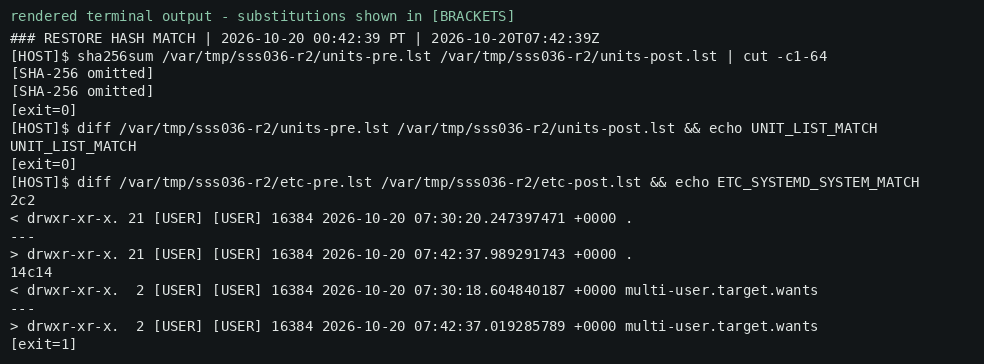
The frames below are rendered terminal output from the masked transcript of a second run at 12:42 AM PT (host frames; see disclosure); they are host output only. The host’s own logs show that every step of that second run ran successfully, and the host’s service list and /tmp contents matched their starting state afterward; the systemd unit directory held the same entries as at baseline; only the directory timestamps of /etc/systemd/system and multi-user.target.wants changed. Bracketed tokens such as [HOST] and [EDR-SENSOR-SERVICE] are redactions.
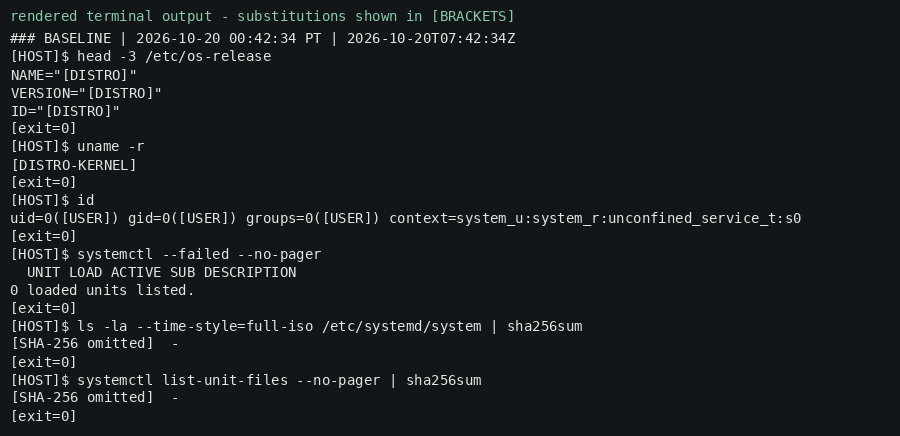


### BASELINE | 2026-10-20 00:42:34 PT | 2026-10-20T07:42:34Z
[HOST]$ head -3 /etc/os-release
NAME="[DISTRO]"
VERSION="[DISTRO]"
ID="[DISTRO]"
[exit=0]
[HOST]$ uname -r
[DISTRO-KERNEL]
[exit=0]
[HOST]$ id
uid=0([USER]) gid=0([USER]) groups=0([USER]) context=system_u:system_r:unconfined_service_t:s0
[exit=0]
[HOST]$ systemctl --failed --no-pager
  UNIT LOAD ACTIVE SUB DESCRIPTION
0 loaded units listed.
[exit=0]
[HOST]$ ls -la --time-style=full-iso /etc/systemd/system | sha256sum
[SHA-256 omitted]  -
[exit=0]
[HOST]$ systemctl list-unit-files --no-pager | sha256sum
[SHA-256 omitted]  -
[exit=0]
### RESTORE HASH MATCH | 2026-10-20 00:42:39 PT | 2026-10-20T07:42:39Z
[HOST]$ sha256sum /var/tmp/sss036-r2/units-pre.lst /var/tmp/sss036-r2/units-post.lst | cut -c1-64
[SHA-256 omitted]
[SHA-256 omitted]
[exit=0]
[HOST]$ diff /var/tmp/sss036-r2/units-pre.lst /var/tmp/sss036-r2/units-post.lst && echo UNIT_LIST_MATCH
UNIT_LIST_MATCH
[exit=0]
[HOST]$ diff /var/tmp/sss036-r2/etc-pre.lst /var/tmp/sss036-r2/etc-post.lst && echo ETC_SYSTEMD_SYSTEM_MATCH
2c2
< drwxr-xr-x. 21 [USER] [USER] 16384 2026-10-20 07:30:20.247397471 +0000 .
---
> drwxr-xr-x. 21 [USER] [USER] 16384 2026-10-20 07:42:37.989291743 +0000 .
14c14
< drwxr-xr-x. 2 [USER] [USER] 16384 2026-10-20 07:30:18.604840187 +0000 multi-user.target.wants
---
> drwxr-xr-x. 2 [USER] [USER] 16384 2026-10-20 07:42:37.019285789 +0000 multi-user.target.wants
[exit=1]Limitations
- This is one Linux lab host; it is not a statement about Windows, any other host, or any customer environment.
- The sensor did not record these commands consistently across the two runs on the same host (see the disclosure after the claim), and the cause is not determined.
- The sensor recorded the activity and raised no alert; that does not mean it “missed,” “ignored” or “allows” service tampering, and it is not proof the alerting path would stay silent for genuine tampering.
- A cloud provider's runtime threat-monitoring agent was also installed and running on the Linux lab host during these runs. It may log or act on activity independently of the EDR sensor under test, and it may affect what that sensor records or alerts on. Its effect on these results was not tested.
- No product comparison, kill score or detection-gap claim is made or supported.
Methods and limitations
Tested against a commercial EDR platform in its full-prevent policy; vendor not named.References
- SSS-RC-2026-036 Part 01 final re-gate (VAL-06), addendum 1:30 AM PT
- VAL-04 gate memo
- VAL-02 two-witness record
Want to know if your endpoint defenses still work?
We test them in your environment and give you a plain written answer.